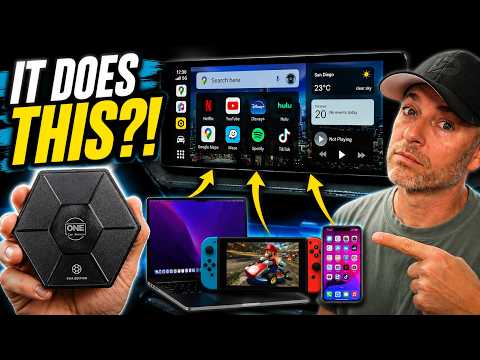
🚗 This CarPlay AI Box Does What Others Can’t! | HE PRO Ultra Review
I’ve reviewed every AI Box that OneCarStereo has released, and in this video I’m putting the new HE PRO Ultra through its paces to see if it’s truly their best one yet.
Instead of simply talking about the features, I test it across multiple vehicles and demonstrate how it performs in real-world use. From wireless CarPlay and Android Auto to HDMI input and output, internet connectivity options, and everyday usability, this review is designed to help you decide whether it’s the right upgrade for your vehicle.
One of my favorite new features is HDMI Input, which lets you connect devices like a MacBook, Nintendo Switch, or other HDMI sources directly to your factory infotainment screen. I also cover HDMI Output for rear entertainment systems, DVR functionality, camera support, streaming performance, and much more.
In this video you’ll see:
✅ Compatibility testing across multiple vehicles
✅ HDMI Input & HDMI Output demonstrations
✅ MacBook, Nintendo Switch & iPhone connectivity
✅ DVR & Baby Camera features
✅ Real-world impressions and final verdict
Update! The HE Pro Ultra will receive a complimentary Bluetooth remote!
Get the HE PRO Ultra here (Affiliate Link):
💰 Use discount code: DON20 to save $20 on the HE PRO Ultra.
Amazon Link HE Pro Ultra:
Amazon: Discount Code: DONSLIFE20
Before You Buy
The HE PRO Ultra is designed for vehicles equipped with wired Apple CarPlay and/or wired Android Auto. An easy way to check compatibility is to plug your phone into your vehicle using a USB cable. If wired CarPlay or Android Auto launches, your vehicle should be compatible.
As always, all opinions expressed in this review are my own based on my real-world testing. OneCarStereo provided the product for review, but they had no editorial control over the content or my conclusions.
If you enjoyed this review, please consider subscribing for more honest automotive technology reviews, truck accessories, product testing, DIY installs, and road trip adventures.
👍 Like the video if you found it helpful.
💬 Leave a comment with your questions or your experience with the HE PRO Ultra.
🔔 Subscribe so you don’t miss future reviews!
Thanks for watching, and I’ll see you in the next one!
Check out these links!
🛒 Audible : First 3 Months Only 99¢ / Month: 👉
🛒 Amazon Gear & Recommended Accessories: 👉
🛒 Donslife Merch & Swag Hub: 👉
🛒 The Latest STANLEY 1913 Drinkware & Gear Deals: 👉
More Ways to Connect & Stay Updated:
🌍 All My Links & Exclusive Deals: 👉
📷 Follow Me on Instagram: 👉
📧 For Questions, Collaborations & Product Reviews: donslifechannel@gmail.com
Disclaimer: Some links may be affiliate links, meaning I earn a commission when you make a purchase. Thank you for the support!
#CarPlay #CarPlayAIBox #CarTech
Music Credits:
YouTube Audio Library
Epidemicsounds.com
Bliss by MusicbyAden |
Music promoted by
Creative Commons Attribution-ShareAlike 3.0 Unported
Looks like Onstar is working on something but will probably be expensive!
Thanks Don, another good review. My interest was in the camera capability but it does not have the functionality I’m hoping to find. I’d like the ability to remotely check on my vehicle when it is parked. Similar to a Ring camera that will sense motion and send alerts to your phone. Ring actually made a camera system for cars that did this but it was discontinued. I’m guessing battery drain and connectivity are the challenges. If you ever do come across a device that does this please do a review. I’m thinking there would be a good market for it. Thanks again!
It’s bizarre having to deal with audio and video syncing in 2026
So your car has to have CarPlay already for it to work.
Do you know if the display out of the AI box will resize properly for a 12″ RAM Uconnect screen?